

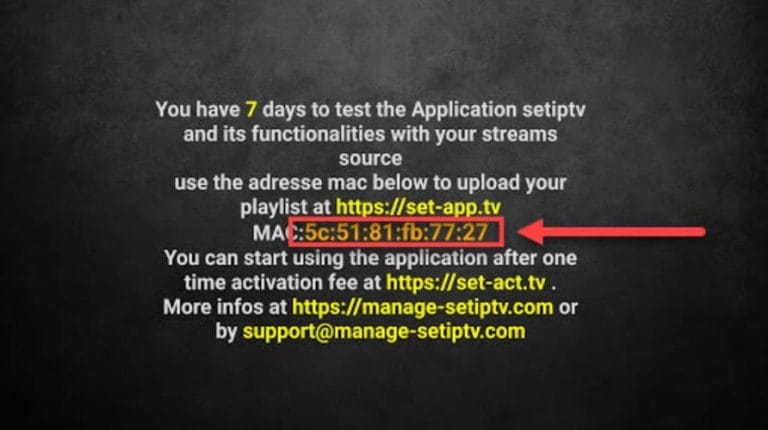

Start the app and note your MAC address in the middle of the box. (ends in 77:27 in the picture).
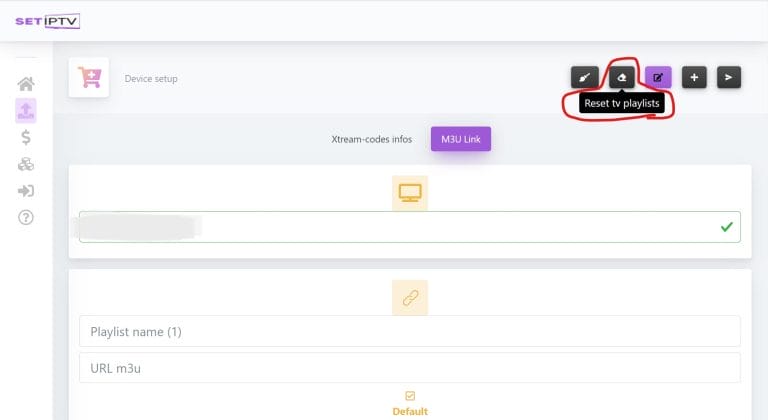
Now visit https://setsysteme.com/set.app and fill in your mac address in the top box that appears in the picture. Then press the button marked in the red box in the upper right corner called “Reset TV Playlists”.
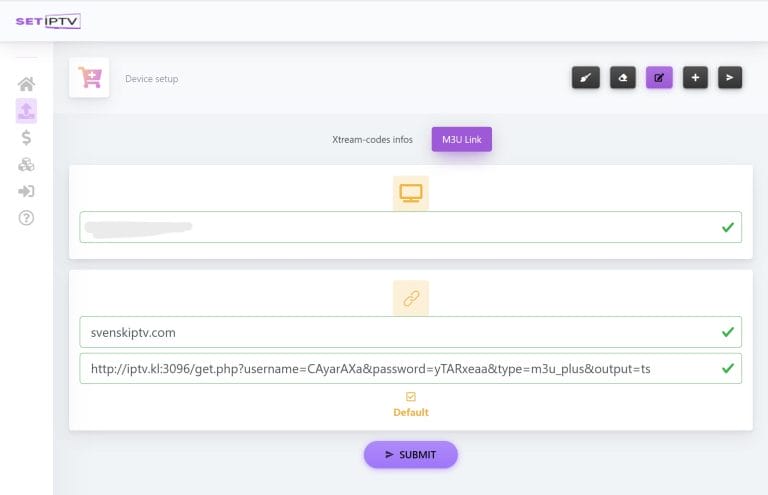
Now copy your m3u link into the box “url m3u” and fill in the name “iptvking.co” in the box “Playlist Name”. Save everything by pressing “Submit”. Now restart your app on the TV and after a while you should see your channels! 🙂
The apps can be downloaded from the Play Store to your device.
Only download the app from a well-known source such as the Play Store. This is because you can accidentally download viruses if you are not vigilant.
Set IPTV with Smart TV is a good combination when you are a beginner or when other options are not available. The app is relatively smooth on TV sets as it is created to work well on all devices. The app is available on most LG, Sony, Samsung and Philips TVs that have Android-based systems. Even if the app works well with your device, it is recommended that you instead use a better app such as Tivimate.
[custom-step-guide id=”14061″]
Set IPTV with Nvidia Shield is therefore a quick and easy solution as it is easy to get started with. Even if the app works well with your device, it is recommended that you instead use a better app such as SET IPTV.
Set IPTV with Android Box works fine to start with. Even if the app works well with your device, it is recommended that you instead use a better app such as Tivimate as that app has a better interface and more stable servers.
Set IPTV with Xiomi Mi S Box or Xiomi Mi Stick are unfortunately not the best devices for IPTV viewing when compared to, for example, Apple TV. This is because the processor in both devices is not the strongest. If you want to watch IPTV with Xiomi Mi devices, it is of course possible and the experience can still be good. However, if you are looking for a more stable, smoother and more long-term solution, this method is not preferable.
Set IPTV with Formuler Box works quite well. However, the Formuler box is created as a slightly different Android box for IPTV as it has its own IPTV app MyTVOnline. The MyTVOnline apps are much better than the SET app and therefore it is recommended that you use them instead. [custom-step-guide id=”14095″]
How do I install Set IPTV on Smart TV?
To install the app on your Smart TV (Samsung, Google TV, LG, or other brands), start by downloading the app from the Play Store. Once you’ve done that, read through the instructions on how the app works on your specific device. Then request a free trial by clicking the button below.
Is Set IPTV free?
No, the app is not free. You can test the app for free for 7 days. Then you need to pay for it. The app costs about 15 EUR.
How do you get subtitles on Set IPTV?
You can get subtitles on the app by pressing the red button on your remote control. However, many have reported that the later versions of the app no longer support subtitles. Therefore, another app is recommended.
You can use the following devices to watch IPTV
Unfortunately, subtitles work poorly on this app. If subtitles are important to you, you should choose another app.
Most titles have subtitles that automatically load with the channels when you start the app. If some channels do not have subtitles, they unfortunately do not, even though most do. In some cases, you can upload subtitles from your own sources, but this is not something we recommend or support as our focus is on more important tasks for our customers.
If you want to know more about subtitles for your app, it’s usually just a Google search away where you can mainly read about this on the app manufacturer’s own website. We wish you good luck! If you need help, we’re always here! In summary, however, subtitles are not the best for this app.