


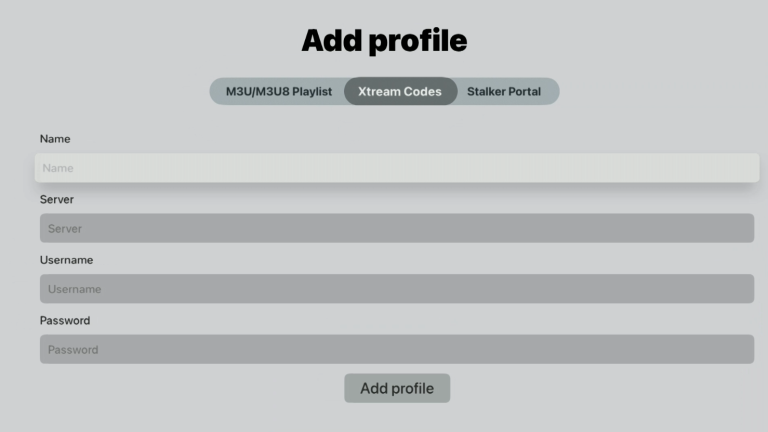

Start the app and press/select “Add profile“.
Select “Xtream Codes” which is the middle option in the image below. In the “Name” field, enter “iptvking.co“. In “Server“, enter your Portal URL provided by us during the free trial or purchase. Then press the “Add profile” button.
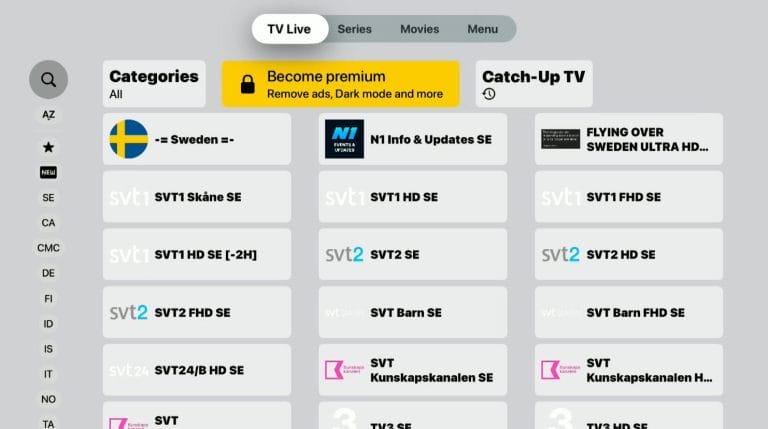
Done! Buy the premium version for the best experience.
The app can be downloaded from the Play Store. APK files are also available for download, but this is not recommended as many may contain viruses. The APK file from IPTV Extreme’s own website no longer seems to be available.
IPTV Expert with Mobile is a mobile app that makes it easy to stream IPTV channels directly on your smartphone or tablet. The app is designed for users who want a smooth and user-friendly experience when watching live TV, movies, and series via IPTV. It supports both M3U lists and EPG (electronic program guide), providing an organized and easy-to-view overview of channels and programs. With the app, you can easily import and manage multiple playlists. It offers support for high-resolution broadcasts and customizable settings for the best viewing experience. The app also has a clean and intuitive interface, making it easy even for new users to get started quickly. It is compatible with both Android and iOS and supports multiple video formats, making it a powerful tool for anyone using IPTV services. We recommend the app IPTVX.
IPTV Extreme with Tablet is a versatile app for tablets that gives you access to IPTV channels in a smooth and efficient way. The app is designed to work optimally on larger screens, making it ideal for tablets, where you can enjoy live TV, movies, and series with crystal-clear picture. It supports M3U lists and EPG (electronic program guide), so you can easily manage and organize your favorite channels. With support for both HD and 4K streaming, the app provides a top-notch visual experience, while its user-friendly interface makes it easy to navigate between channels and content. You can also import multiple playlists, adjust streaming quality, and choose different video players to customize the experience to your needs. IPTV Expert is compatible with both Android and iOS tablets and offers support for multiple formats, making it a flexible solution for all IPTV users. [custom-step-guide id=”26275″]
IPTV Expert on Computer is a powerful and user-friendly application for computers that lets you stream IPTV channels in an easy and smooth way. With its user-friendly interface, it provides an intuitive experience for both beginners and experienced users. You can easily import M3U playlists and use the EPG (electronic program guide) to get a structured overview of available channels and programs. IPTV Expert supports a variety of video formats and delivers high-resolution streaming, making it ideal for those who want to watch live TV, movies, and series with the best possible picture quality. The app is optimized for both Windows and macOS, and it gives you the ability to customize settings to optimize your streaming experience. Its support for multiple playlists and easy content management makes it an excellent choice for IPTV enthusiasts who want full control over their media content on the computer.
[custom-step-guide id=”26271″]
IPTV Expert on Apple TV is an advanced application for Apple TV that allows you to stream IPTV channels directly on your TV with the highest quality. It is specially designed to work seamlessly on the Apple TV platform and offers an intuitive user experience, perfectly tailored for larger screens. With IPTV Expert, you can easily import M3U playlists, providing access to a wide range of live TV, movies, and series. The app also supports EPG (electronic program guide), making it easy to get a clear overview of what’s being broadcast on different channels.
The app offers support for HD and 4K resolution, allowing you to enjoy content with fantastic sharpness and detail. IPTV Expert on Apple TV has smooth navigation and easy-to-use features that let you quickly switch between channels, browse playlists, and customize your viewing settings for the best possible experience. The app also supports multiple formats and provides the option to choose between different video players, meaning you can customize your viewing experience to your needs and preferences.
In summary, IPTV Expert on Apple TV is a reliable and flexible solution for anyone who wants to enjoy IPTV content on a larger screen with the highest possible quality and comfort. However, if you have access to an Apple TV, the app IPTVX is recommended instead.
[custom-step-guide id=”26266″]
How to install IPTV Expert on Smart TV?
Currently, this exact app is not available for Smart TV. Similar apps with the same or similar names are available. Please see our other guides for Smart TV.
Is IPTV Expert free?
No, the app is not free. You can try it for free, but we recommend purchasing the PRO version for about 20 EUR as it unlocks some great features.
How to get subtitles on IPTV Expert?
You can get subtitles on the app by pressing the red button on your remote control. You can also select “Subtitles” in the menu at the bottom of any movie/series.
You can use the following devices to watch IPTV