
You can see Xtream IPTV instructions here. The app is relatively new and works well for watching IPTV. It’s also very easy to get started with. The app allows you to upload your channels in the following ways:
It is recommended to upload your IPTV playlist with Xtream Codes API (that is, with your username, password, and Portal URL that you receive from us upon purchase or free trial). This is because your EPG (Program Guide) is then automatically installed in the background. If you choose, for example, M3U, you need to manually fill in your EPG link that you receive from us. However, this does not apply to this app. With Xtream IPTV, you cannot edit your playlist or install EPG separately.
The Pro version is available for all the above devices, whether iOS or Android-based. Unfortunately, this app is quite expensive compared to other apps, and the prices vary depending on the operating system. On iOS devices (Apple), the app costs 26 EUR, and on Android-based devices, it costs 23 EUR per year. Therefore, it is quite expensive in our opinion.
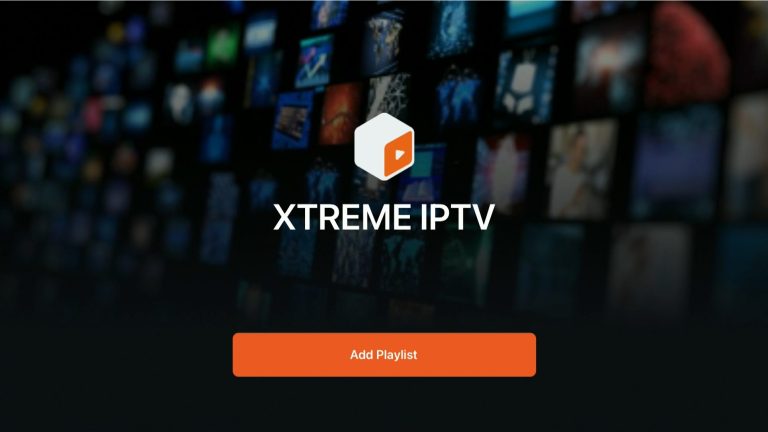
Start the app and press “Add Playlist“.
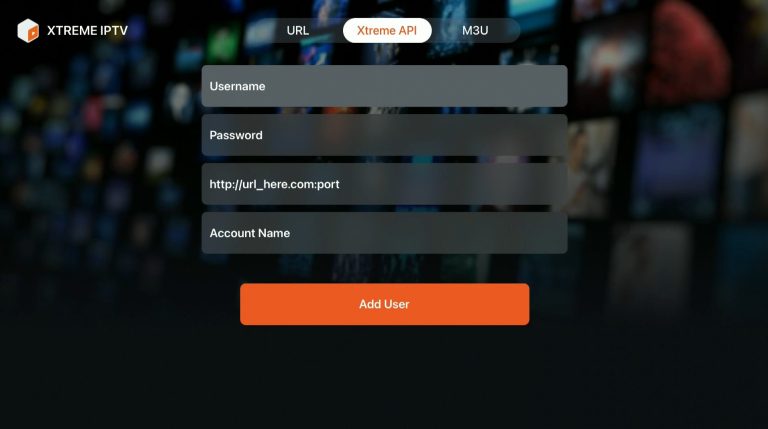
Here you fill in the details you received from us via email. You receive the details when you request a free trial or purchase our service. In the box “Account Name” as shown in the picture, fill in “iptvking.co“. The details for the other fields are provided via email after ordering.
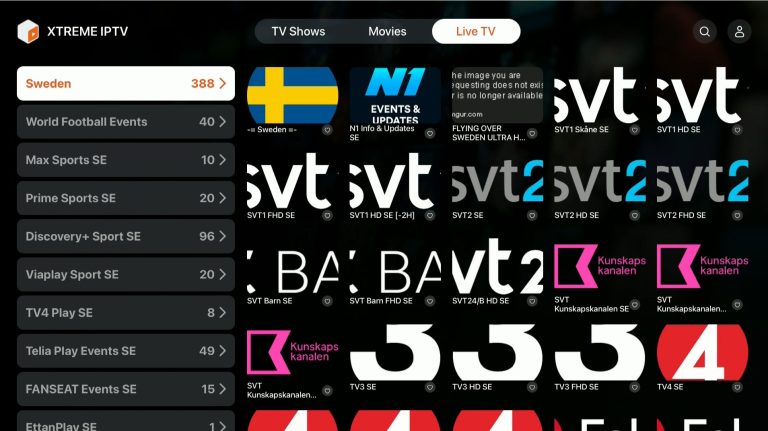
Done! Note that with this app, at the time of writing, on Apple TV, you cannot edit the playlist or reload/change EPG settings.
The app can be downloaded from Play Store and App Store to your device.
Only download the app from a well-known source such as the App Store or Play Store.

Xtream IPTV with Apple TV is a relatively good solution as the interface looks good. Since you cannot edit the playlist or change other settings, we do not consider this the best app for Apple TV, even though it tends to work well. Xtream IPTV’s developers need to add more features for the app to be worth 299kr/year. IPTVX is, in our opinion, a better solution and more affordable. [custom-step-guide id=”24483″]
Xtream IPTV with Smart TV is a good combination for beginners. The app is convenient on TVs as it is designed to work best on Smart TV systems, Android TV, and Android boxes as well as mobiles. The app is available on most LG, Sony, Samsung, and Philips TVs with Android-based systems. Even if the app works well with your device, it is recommended to use a better app like Tivimate. [custom-step-guide id=”24483″]
Xtream IPTV with Mobile is a quick and convenient solution if you want to get started in no time. IP TV on mobile with the app is a very simple solution if you want to watch TV on the go. However, if you have an Apple TV, it is recommended to use the IPTVX app instead.
Xtream IPTV with Tablet is a quick and convenient solution if you want to get started quickly on your iPad or Android-based tablet. IP TV on the tablet with the app is a very simple solution if you want to watch TV on the go. The app works well on iPad (iOS) too, but the IPTVX app is recommended there instead.
[custom-step-guide id=”24486″]
How to install Xtream IPTV on Smart TV?
To install the app on your Smart TV (Samsung, Google TV, LG, or other brands), start by downloading the app from the Play Store. Once you’ve done that, read through the instructions on how the app works on your specific device. Then request a free trial by clicking the button below.
Is Xtream IPTV free?
There is a free version of the app, but the paid version is obviously a notch better. We recommend buying the full version for about 26 EUR per year as it unlocks some great features.
How to get subtitles on Xtream IPTV?
Subtitles are standard on most movies and series, but to display them on this app, you must select “Subtitles” at the bottom of the screen.

Xtream IPTV is a popular app for streaming TV channels, movies, and series via IPTV (Internet Protocol Television). It gives users access to thousands of channels from around the world and works on both mobile devices, computers, and smart TVs. One of the biggest advantages of Xtream IPTV is that it supports both live TV and on-demand content, which means users can watch their favorite shows anytime.
The app is easy to install and use. After downloading the app, the user only needs to enter their login details from their IPTV provider, which includes username, password, and server address. Xtream IPTV offers a customizable experience with the ability to create favorite lists, as well as different viewing modes to make navigation easy and smooth.
Xtream IPTV is also known for supporting various formats and codecs, ensuring that streams play with high quality, regardless of the device’s performance. With a stable internet connection, users can enjoy a seamless viewing experience without buffering. In summary, Xtream IPTV is a versatile and user-friendly option for those who want a wide range of TV channels and on-demand content directly on their devices.
You can use the following devices to watch IPTV