
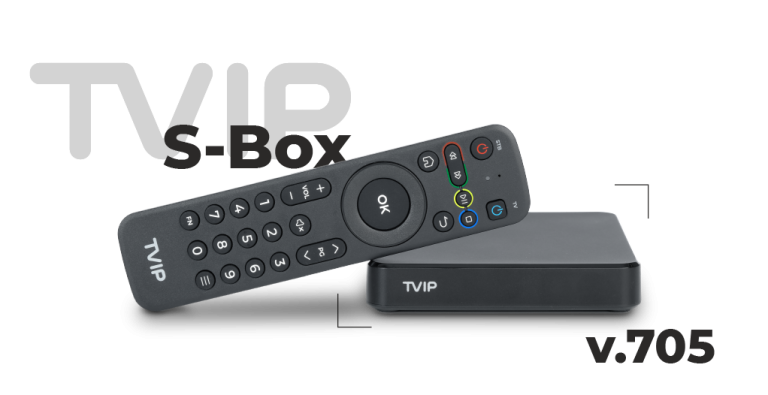
TVIP Instructions for IPTV for all TVIP boxes are available here. The box comes in many different models, but the three most common are TVIP 705, TVIP 605, and TVIP 415. All models are really good for watching IPTV.

The TVIP box is one of the most advanced IPTV boxes on the market today. It’s also relatively easy to get started with. The box allows you to install your channels via the box’s portal settings.
It’s usually recommended to upload your IPTV playlist using the Xtream Codes API (that is, with your username, password, and Portal URL that you receive from us upon purchase or free trial). This is because your EPG (Electronic Program Guide) is then installed automatically in the background.
However, you don’t need to worry about this with your TVIP box. With our TVIP instructions, you’ll easily get started with your new box.
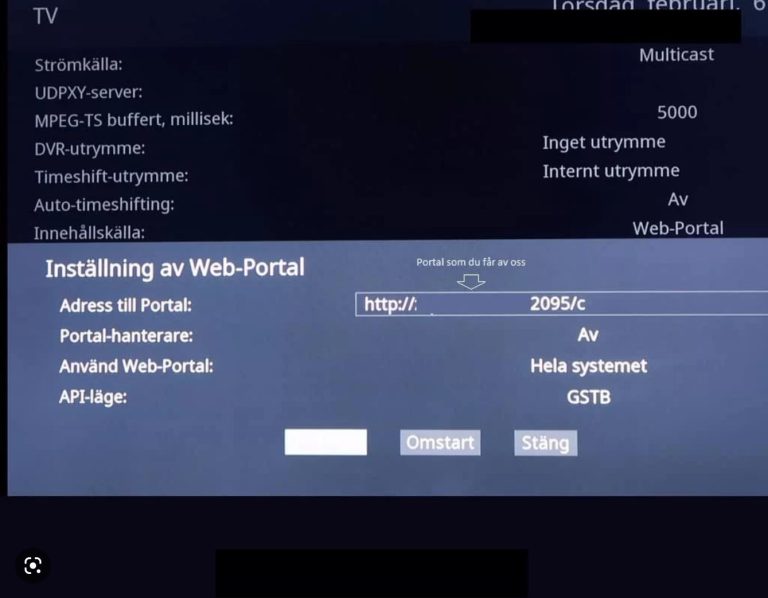
Start the box and enter the details you received from us via email. Sometimes you need to accept the terms before you see this box, and then you just press your OK button. When you see this box, enter the Portal URL you received from us. Your Portal URL should end with “/c” so that it looks like this, for example: http://abcd.se:3095/c
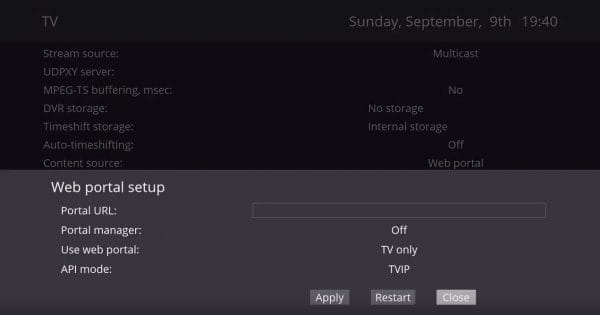
Select “Web Portal” and then “Setup Web portal“.
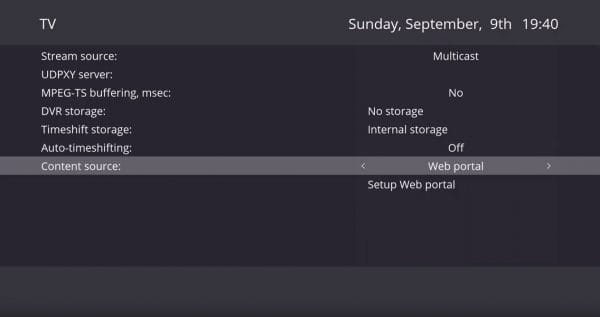
When you’ve selected “Setup Web portal“, you’ll come to this page. Here you set the settings to match the image below.
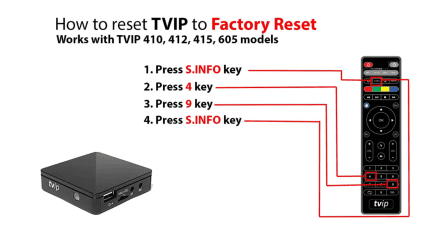
Below you can see how to perform a factory reset on a TVIP box regardless of model.
TVIP Instructions. TVIP 705 is a popular IPTV box known for its reliable performance and user-friendliness. It offers a smooth and stable experience for streaming TV channels and on-demand content via the internet. The box is compatible with various IPTV services and supports both high-definition (HD) and ultra-high-definition (4K) video streams, making it an excellent choice for those who want to enjoy high-quality picture on their TV sets.
One of the great advantages of TVIP 705 is its easy installation and intuitive user interface. It comes with a remote control that makes it easy to navigate between different apps and content. With support for both wired (Ethernet) and wireless (Wi-Fi) internet, it offers flexibility depending on the user’s network settings.
The box is also equipped with a powerful processor, which allows it to handle multiple applications simultaneously without delays. TVIP 705 also supports popular formats such as MPEG-2, MPEG-4, H.264, and H.265, ensuring that it can play a wide range of media files without issues.
In summary, TVIP 705 is a reliable and versatile IPTV box that suits both beginners and experienced users who want a simple and stable solution for streaming their favorite channels and movies. In addition to TVIP boxes, we also recommend IPTV Nvidia Shield, IPTV Apple TV, IPTV Formuler Box.
The previous model TVIP 605 is a compact and affordable IPTV box that offers a reliable streaming experience for TV channels and on-demand content via the internet. The box supports HD resolution and offers easy installation with a user-friendly interface. With support for both wired Ethernet and Wi-Fi connection, it provides flexibility depending on the user’s network conditions. TVIP 605 is equipped with an efficient processor that enables fast navigation and stable performance. It also supports popular video formats such as MPEG-4 and H.264, making it a good choice for those seeking a smooth IPTV solution at an affordable price.
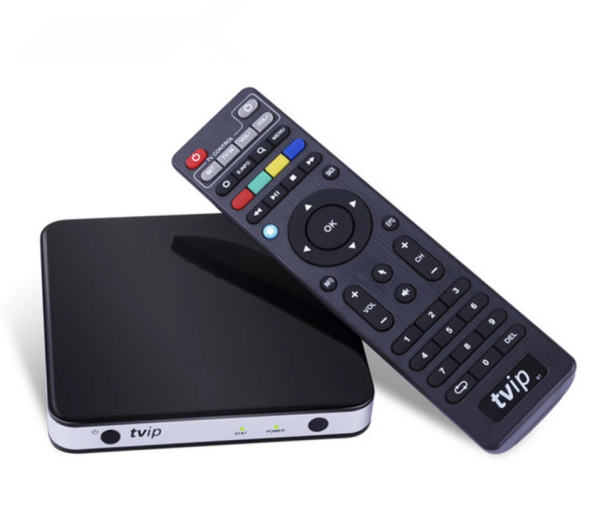
TVIP 415 is a reliable and compact IPTV box designed to deliver a smooth streaming experience for both live TV and on-demand content. It supports HD resolution and offers stable performance for daily use. With its simple installation and user-friendly interface, TVIP 415 is easy to use, even for beginners. The box supports both wired and wireless (Wi-Fi) connection, providing flexibility depending on the network environment. Its support for popular video formats such as H.264 and MPEG-4 allows it to handle a wide range of media files, making it a good choice for IPTV users.
TVIP instructions for TVIP 705. This box is the later variant in their range. The box is relatively easy to get started with and maintains the same quality as the other boxes with slightly better features. A setup that maintains the same quality as TVIP 705 is the IPTVX app with Apple TV.
[custom-step-guide id=”11929″]
TVIP Instructions for the 605 box. TVIP 605 is the previous model that was very popular for several years. The 605 was the box that made TVIP as well-known as they became. The installation process on this box is similar to the other TVIP boxes in the same series. This box is installed as follows.
[custom-step-guide id=”11929″]
TVIP Instructions for all TVIP boxes. All TVIP boxes are the same when it comes to installation. Whether you have an older or later model, the installation process is similar if not exactly the same.
[custom-step-guide id=”11929″]

How do you install IPTV on a TVIP box?
To install your channels on a TVIP box, you need a Portal URL/Server Address. You get this from us when you request a free trial and state that you want to try our service with a TVIP box.
Where can you buy the box?
The box can be purchased at www.iptv-box.se.
How do you get subtitles on your TVIP box?
You get subtitles on the app by pressing the red button on your remote control.
Do I need to download any app?
No, it’s not necessary.