

MyTVOnline apps can be downloaded to your box and soon to your mobile device (MyTVOnline+).
The app is simple and easy to get started with on your box regardless of model and is recommended for everyone who has a Formuler box. Even though it’s an Android Box that can support several different apps, it’s recommended to only use MyTVOnline.
On this page you’ll find instructions for the following apps:
MyTVOnline3 is currently the most advanced version of the apps until MyTVOnline4 is released. It’s fairly easy to get started with and the app allows you to load your channels in the following way:
It’s usually recommended to upload your IPTV playlist using Xtream-codes API (that is, with your username, password, and Portal URL that you receive from us upon purchase or free trial).
However, MyTVOnline is an exception when you’re using a box. Here it’s recommended instead to get started via the Portal option. You’ll see how below.
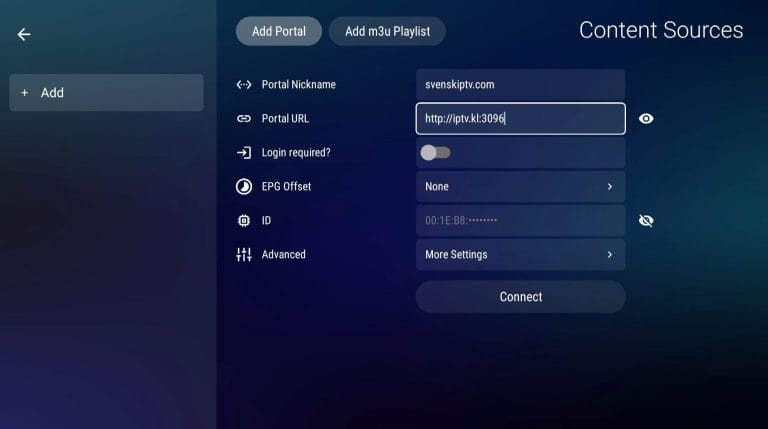
Start the box and open the MyTVOnline3 app (if you have an older box, see the instructions for older apps below). Go to “Content Sources“. Under “Portal Nickname” enter the name “iptvking.co“.
In the “Portal URL” field, enter your Portal URL that you received from us by email. Then press the OK button on your remote. If you haven’t done so already, you should now place an order and provide us with your box ID/MAC address (starts with 00:1E or 00:1A) which can be found in the settings or on the bottom of your box.
Restart your box. Done! 🙂

As you can see, it’s very easy to get started. However, remember that if you have an older box, there’s a high chance you’ll need to provide us with your “Box ID” rather than “MAC address”.
MyTVOnline1 works well with older Boxes. Since you can install the MyTVOnline1 app and many other apps, the older boxes are units that can be used for TV viewing. However, we always recommend clearing unnecessary apps that aren’t being used and having a newer model since most IPTV lists today are very large and contain hundreds of thousands of titles such as Channels, movies, series, documentaries, etc.
MyTVonline1 is the first app in the series where there are currently three different versions.


MyTVOnline3 works well with newer boxes. Since you can install the MyTVOnline3 app and many other apps, we recommend these for your Formula device.
MyTVonline3 is currently the latest app in the series where the app works best with later models of Formula boxes. The fourth version of the app should be released soon (estimated year 2025).

MyTVOnline4 hasn’t been released yet. It’s expected to be released sometime in 2025, but this is only a preliminary date. The app is expected to be released alongside a later version of the Formula box. Keep an eye on their website so you don’t miss the release!

The apps are already in your box at startup depending on which box you have in the Formula series. If you accidentally remove the app, it can be downloaded from the box’s “marketplace” or app store. You can also factory reset the box and it will appear again.
MyTVOnline1 is a quick and smooth solution as it’s easy to get started with. However, the app is for older boxes.
[custom-step-guide id=”14195″]
MyTVOnline2 works great on middle-aged boxes as the app was launched a few years ago. See the instructions below.
[custom-step-guide id=”14255″]
MyTVOnline3 is currently the latest app in the series until version 4 launches soon. This app works excellently with the later boxes and is strongly recommended over other Android-based apps. See the instructions below for this app.
[custom-step-guide id=”14259″]

How do you install MyTVOnline on your Formuler box?
You don’t need to install the app. It’s already on your device.
Is MyTVOnline free?
Yes, the app is free as it comes with your box. When you buy the box, you’ve already paid for the app.
How do you get subtitles on MyTVOnline?
You can get subtitles on the app by pressing the red button on your remote. You can also select “Subtitles” in the menu on each individual channel to access subtitles if available.
You can use the following devices to watch IPTV