
9Xtream IPTV is available on multiple devices such as Smart TV, boxes, and for mobile and tablets. The app allows you to stream channels on your IPTV device.

9Xtream IPTV is a relatively new app available on various devices. 9Xtream IPTV is easy to start with as you only need to enter your login details directly in the app. You don’t need to upload your playlist via their website like with many other apps.
The app allows you to upload your channels in the following ways:
It is recommended to upload your IPTV playlist with Xtream Codes (i.e., with your login details provided by us upon purchase or free trial). This is because your EPG (Program Guide) will then be automatically installed in the background.
If you choose M3U, for example, you will need to manually enter your EPG link provided by us.
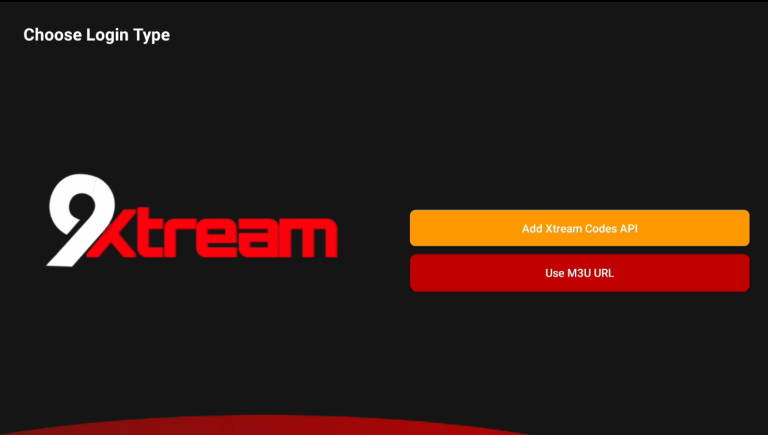
Then press “Add Xtream Codes API“. Then enter your login details provided by us. Then press “Save” or “Next“.
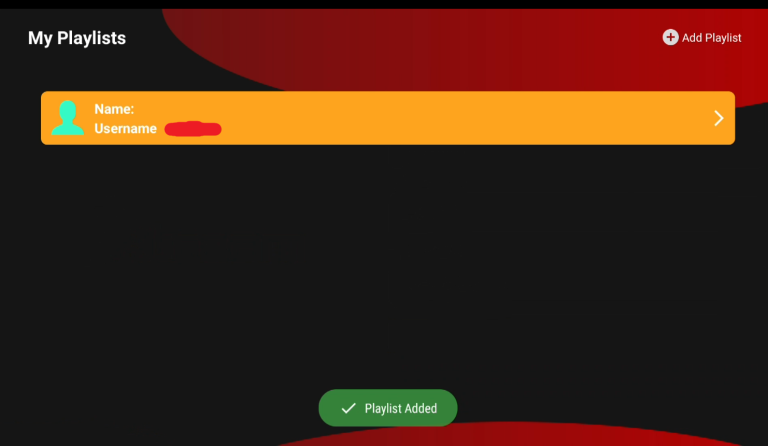
Start the app and press “Add Playlist” in the top right corner.
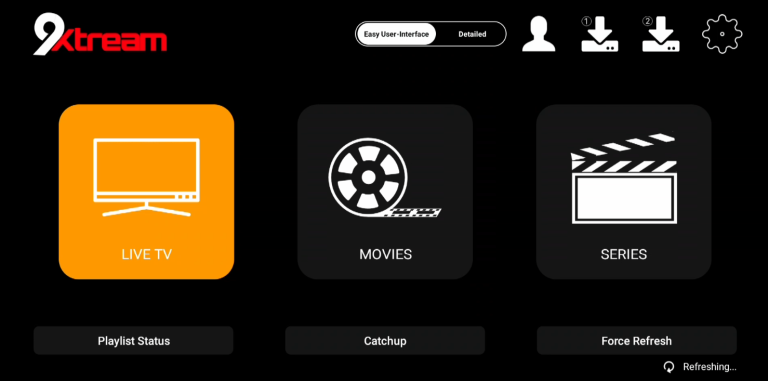
Now press, for example, “Live TV” if you want to see all channels. Done! 🙂
The app can be downloaded from the Play Store or from the “store” on your TV. APK files are also available for download, but this is not recommended as many may contain viruses. However, the APK file from 9Xtream IPTV’s own website is okay to download.
9Xtream IPTV med Smart TV är en bra kombination när man precis har kommit igång med IPTV. The app works well with Smart TV LG and of course other Smart TV brands like Samsung, Sony, Philips, etc. Since you can install the 9Xtream IPTV app and many other apps, Smart TV LG is a device that can be used for TV viewing. However, we always recommend clearing unnecessary apps that are not used and having a slightly newer model as most IPTV lists today are very large and contain hundreds of thousands of titles such as channels, movies, series, documentaries, etc.
9Xtream IPTV is a powerful app that offers Smart TV users access to a wide selection of IPTV channels, movies, and series. The app is easy to install and provides a smooth user experience with fast navigation and high-quality streaming. With support for various formats and resolutions, you can enjoy your favorite content in HD or 4K, depending on your internet connection. Additionally, the app offers EPG (Electronic Program Guide) for easy channel management and planning. 9Xtream IPTV is an ideal choice for those who want to maximize their TV entertainment with comprehensive and varied content. Even though the app works well with your device, it is recommended to use a better app like Tivimate.
[custom-step-guide id=”25925″]
9Xtream IPTV with Nvidia Shield is a good solution, but there are better solutions to get started with. The app is designed to work best with Android-based systems.
9Xtream IPTV is an ideal app for Nvidia Shield that offers high-quality IPTV streaming with a wide range of TV channels, movies, and series. The app is optimized to take full advantage of Nvidia Shield’s powerful hardware and provides a smooth and fast user experience. With support for HD and 4K resolution, it delivers crystal-clear images and seamless playback, making it perfect for entertainment on large screens. User-friendly features like EPG (Electronic Program Guide) and easy navigation make it easy to browse and manage channels. 9Xtream IPTV on Nvidia Shield is an excellent choice for a premium IPTV experience.9Xtream IPTV with Android Box works quite well to start with. The app is designed to work best with Android-based systems.
9Xtream IPTV is an efficient app for Android Box that gives users access to a wide range of IPTV channels, movies, and series. The app is optimized for Android devices and offers a smooth and stable streaming experience in high quality. With features like support for various video formats and resolutions, including HD and 4K, you can easily enjoy your favorite shows without interruptions. The app also has a user-friendly interface and supports EPG (Electronic Program Guide) to facilitate channel browsing and scheduling. 9Xtream IPTV is a perfect choice to maximize your entertainment on Android Box. But even though the app works well with your device, it is recommended to use a better app like Tivimate as that app has a better interface and more stable servers.9Xtream IPTV with Xiomi Mi S Box or Xiomi Mi Stick are unfortunately not the best devices for IPTV viewing when compared to, for example, Apple TV. This is because the processor in both devices is not the strongest. If you want to watch IPTV with Xiomi Mi devices, it is of course possible, and the experience can still be good. However, if you are looking for a more stable and smoother solution, this is not preferable.
9Xtream IPTV with Formuler Box works quite well. However, the Formuler box is designed as a slightly different Android box as it has its own IPTV app
9Xtream IPTV with Mobile is an okay solution if you don’t have any other options. IPTV on mobile with this app is a slightly more complicated solution if you want to watch TV on the go. In other words, there are better apps suited for mobile such as IPTV Smarters. If you have an iPhone, it is recommended to use the app IPTVX instead.
9Xtream IPTV with Tablet is better than on mobile if you want to get started on your Android-based tablet. IPTV on the tablet works quite well if you want to watch TV on the go. However, if you have an iOS (iPad) device, the app IPTVX is recommended instead. [custom-step-guide id=”25913″]

How to install 9Xtream IPTV on Smart TV?
To install the app on your Smart TV (Samsung, Google TV, LG, or other brands), start by downloading the app from the Play Store. Once you’ve done that, read through the instructions on how the app works on your specific device. Then request a free trial by clicking the button below.
Is 9Xtream IPTV free?
No, the app is not free. You can try it for free, but we recommend purchasing the PRO version for about 3 EUR as it unlocks some great features.
How to get subtitles on 9Xtream IPTV?
You can get subtitles on the app by pressing the red button on your remote control. However, many have reported that the later versions of the app no longer support subtitles. Therefore, another app is recommended.
You can use the following devices to watch IPTV

Unfortunately, subtitles work poorly on this app. If subtitles are important to you, you should choose another app.
Most titles have subtitles that automatically load with the channels when you start the app. If some channels do not have subtitles, they unfortunately do not, even though most do. In some cases, you can upload subtitles from your own sources, but this is not something we recommend or support as our focus is on more important tasks for our customers.
If you want to know more about subtitles for your app, it’s usually just a Google search away where you can mainly read about this on the app manufacturer’s own website. We wish you good luck! If you need help, we are always here!